Math Is Fun Forum
You are not logged in.
- Topics: Active | Unanswered
#1626 Re: This is Cool » Angle of reflection » 2005-10-30 12:58:05
I'll probably be using this in my 3d engine as it progresses, for reflections of light and shading.
#1627 Re: This is Cool » Angle of reflection » 2005-10-28 14:22:45
Try it for differant angles. It always works. Sometimes it will give an answer greater then 360 but its still the right direction. Whats cool is it doesn't have to know what side its on.
#1628 This is Cool » Angle of reflection » 2005-10-28 14:11:25
- mikau
- Replies: 2
I tend to enjoy reinventing the wheel, coming up with formulas for things that I know, have already been figured out. Its more fun when you don't know the formula for something (ie. a 3d engine) but try to figure it out yourself rather then looking it up and being told. (thats no fun)
I thought I'd figure one out for reflection. I came across a need for this in one of my programs. It is said angle of incidents equals angle of reflection. Well thats nice but that only deals with the angles in relation to eachother, how about in relation to the world? It would be nice to have a simple formula to calculate the angle of reflection in relation to angle zero. And not have to worry about the angles in relation to eachother, and which side of the object you are on.
My drawing shows a formula I came up with. Where angle A is the angle of a flat surface in relation to zero and B is the angle at which the object is moving, in relation to zero. Read the diagram.
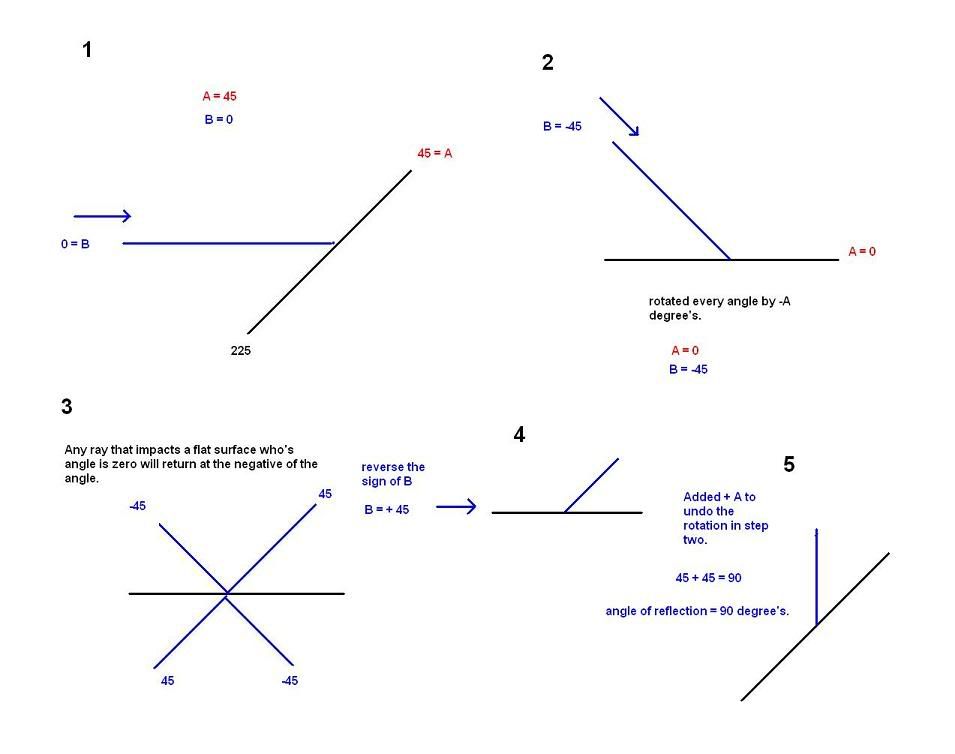
First we subtract A from B, and A from A to rotate the whole picture so that Angle A is zero. When an object impacts a flat surface who's angle is zero, it returns at the negative of angle at which it was moving, whether it hits it from above or below. Now that we have the correct reflection, we must add the original value of A again to rotate it back to where it was. This gives us the correct angle of reflection.
Now lets take a look at what we did:
We took the original angle B and subtracted angle A:
(B - A)
We reversed the sign of the this differance
-(B - A)
Then added angle A to find the angle of reflection
-(B-A) + A
Simplified:
Angle of reflection = 2A B where A is the angle of a flat surface, and B is the angle at which the incoming object is moving. Hardly complicated, but fun to figure out all the same. :-)
#1629 Re: Help Me ! » Help! - Function inverse » 2005-10-17 10:41:17
Aww.... lol.
#1630 Re: This is Cool » My 3D engine: reinventing the wheel » 2005-10-17 10:32:49
Acedemic price? Any sponsering I get at home comes out of my own pocket. lol. I think I'll give myself a scholarship! :-D
Do "visual c++" compilers have graphing programs and stuff? I would assume thats what visual means.
#1631 Re: This is Cool » My 3D engine: reinventing the wheel » 2005-10-17 07:16:54
And heres the 3d projection program. Simply rotates view about the xz axis centered on you, for horizontal rotation, then rotates on the yz axis for vertical rotation. The rotations around you in the negative direction of the angle given. It looks like your turning n degree's to the right, but really everything just moved n degree's to the left. Copies are made of the points coordinates so the rotated and translated points have no effect on the objects real coordinates. :-)
void project(float XZangle, float YZangle, point &thepoint, point viewpoint)
{float tempx = thepoint.x; // creating temporary copies so real coordinates are not effected
float tempy = thepoint.y;
float tempz = thepoint.z;rotate(-XZangle, viewpoint.x, viewpoint.z, tempx, tempz); //XZ rotate
rotate (-YZangle, viewpoint.z, viewpoint.y, tempz, tempy); //YZ rotatefloat zdistance = (tempz - viewpoint.z); //finding directed z distance
float scalefactor = 100/zdistance; // finding scale factor to smaller triangle
thepoint.Vx = ((tempx - viewpoint.x) * scalefactor); // finding directed x distance, scaling down
thepoint.Vy = ((tempy - viewpoint.y) * scalefactor); // finding directed y distance, scaling down
std::cout << "point at " << thepoint.Vx << ", " << thepoint.Vy << "\n";
}
And thats all there is to show so far. I'm sorry a lot of this is sloppy coding. Really a lot of the functions should have certain paremeters declared constant as they will not and should not be changed, I have a lot of polishing to do. I'm just a beginer at C++ so I tend to forget to do things like that.
Thats all there is to it so far.
#1632 Re: This is Cool » My 3D engine: reinventing the wheel » 2005-10-17 07:06:41
Next we have the class point that has x,y, z and vX, vY member variables. (v for virtual. The points that are used to display the object in 3d)
class point
{
public:
float x;
float y;
float z;
float Vx;
float Vy;
point(float setx, float sety, float setz);
};
I might change the virtual coordinates to integers.
#1633 Re: This is Cool » My 3D engine: reinventing the wheel » 2005-10-17 07:02:42
Heres the purpose of all those functions. Rotate. This takes the x,y coordinates of a center point and the x,y coordinates of the object, and an angle of rotation. The object is converted to polar form in relation to the center object. Then the angle of rotation is added to its polar angle. This new angle is used when converting back to polar form, rotating the given point by the given degree around the given center point.
void rotate(float angle, float centX, float centY, float &objX, float &objY)
{float dist = distance(centX, centY, objX, objY); // finding distance from specified origin to object
float angleto = polarangle(centX, centY, objX, objY); // finding angle to object from specified origin
std::cout << "orig angle " << angleto << "\n";angleto += angle; // adding rotated angle
std::cout << "new angle " << angleto << "\n";
rect(angleto, dist, centX, centY, objX, objY); // converting back to rectangular form using the new angle
}
#1634 Re: This is Cool » My 3D engine: reinventing the wheel » 2005-10-17 06:55:30
This function is for converting from polarform back to rectangular form. It takes x,y coordinates of the center, and the x,y coordinates of the object. (the function assumes the angle is in polar form from the center x, y coordinates that you insert). It multiplies the supplied length by the cosine of the angle to find the x distance, this length is then added to the center x coordinate and the x value is assigned this new coordinate. Same goes with y only you use the sine of the angle and add the result to the center y coordinate. Its really hard to explain in words.
void rect(float angle, float length, float centX, float centY, float &x, float &y)
{
y = length * sin(angle * 3.14159/180);
x = length * cos(angle * 3.14159/180);
y += centX;
x += centY;
std::cout << "rect " << x << ", " << y << "\n";
}
x, and y are not used as paremeters to the function, they are only passed into the functions so their values can be reassigned.
#1635 Re: This is Cool » My 3D engine: reinventing the wheel » 2005-10-17 06:45:13
Heres the distance formula:
float distance(float obj1X, float obj1Y, float obj2X, float obj2Y)
{
float x =(obj1X - obj2X);
float y = (obj1Y - obj2Y);
std::cout << "distance " << sqrt(x*x + y*y) << "\n";
return sqrt(x*x + y*y);
}
I know I created unecessary variables but it kept screwing up without them. Notice I added some coutstatemts to track program flow and function accuracy.
#1636 Re: This is Cool » My 3D engine: reinventing the wheel » 2005-10-17 06:42:20
lol. Well anyways I figured I'd post some code now.
Heres another copy of my polarangle function.
float polarangle(float centX, float centY, float objX, float objY)
{float x, y, r;
y = objY - centY; // finding vertical distance from centv, to objvx = objX - centX; //finding horrizontal distance from centh, to objh
if ((x == 0) && (y < 0)) { return 270;} // avoid division by zero
if ((x == 0) && (y > 0)) { return 90; } // avoid division by zero
if ((x == 0) && (y == 0)) { return 0; } // points overlap, no angler = atan(y/x) * 180/3.14159; //calling arctan and converting radians to degree's
if (x < 0) { return (r + 180);}
return r;
}
#1637 Re: This is Cool » My 3D engine: reinventing the wheel » 2005-10-17 06:28:00
I break my cerebellum to figure out how to write a 3d engine and your impressed that I make nine posts in a row? O_o
#1638 Re: This is Cool » My 3D engine: reinventing the wheel » 2005-10-17 05:29:17
:-D Thanks guys. But I'm not sure what you mean by a nontuple post.
Yeah what I need is a graphing program to plot the points in realtime. Right now I have to tediously insert the points into the program and plot them manually. I don't know what sort of program I need though.
Yeah animations would be relatively easy if I had a realtime graphing program and access to a timer function so I can set the speed.
Oh and I can rotate the box easy as pi! ;-) All I have to do is speficy the center of rotation in the center of the box, instread of around the viewer, and rotate the box's points using my rotate function. All I need is a realtime grapher and I could have a lot of fun with this.
#1639 Re: Help Me ! » Help! - Function inverse » 2005-10-16 16:18:34
Well I have to sign off now, I'm still looking for it. I'll post it tommorow if I find it. Sorry for the delay.
#1640 Re: Help Me ! » Help! - Function inverse » 2005-10-16 16:10:05
Because its an exponential equation. I remember this exact topic being discussed but I can't remember how it went. I'll see if I can find it in my mathbook.
#1641 Re: Help Me ! » Help! - Function inverse » 2005-10-16 15:34:54
I think your writing the inverse function, so your actually solving for x and not for y. I'm trying to remember how this is done. I think you swap x and y, and then once you solve for it, mirror it about the line y = x or something like that. I need to review it.
#1642 Re: This is Cool » My 3D engine: reinventing the wheel » 2005-10-16 14:55:58
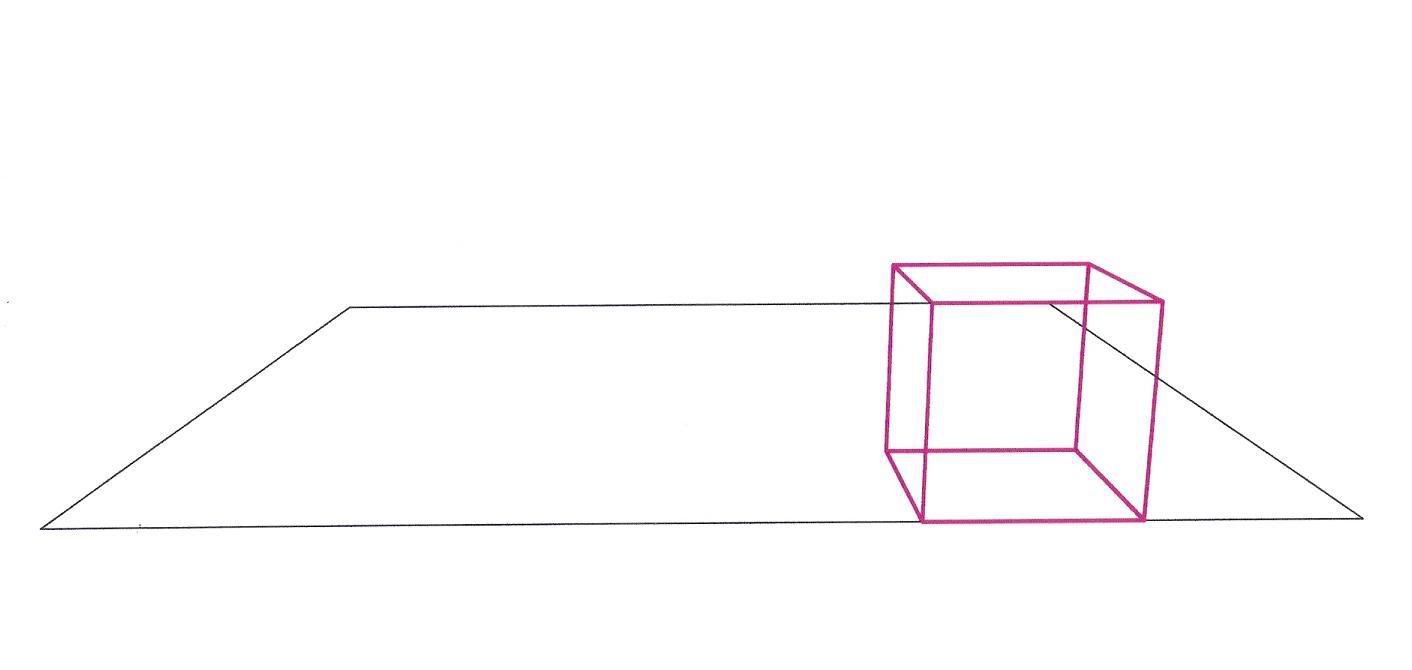
Ok, I used my program to calculate the Vx and Vy coordinates of that same box, with the angle of view rotated 15 degree's down. I also put the box on the front of a flat surface. Then I used autoCAD to plot the points for me. You can see the box now begins to vanish downward.
Ah... the power of math...
#1643 Re: This is Cool » My C++ polarangle function » 2005-10-16 14:52:49
(edit) oops! Wrong thread! x_x
#1644 Re: This is Cool » My C++ polarangle function » 2005-10-16 14:47:41
Hmm... yeah I guess if we ever need the sin, cosine, tangent or arctangent of a negative angle, that would occur.
#1645 Re: This is Cool » My C++ polarangle function » 2005-10-16 14:04:13
Well radians will always be positive...hmmm... might be a good idea. :-)
#1646 Re: This is Cool » My 3D engine: reinventing the wheel » 2005-10-16 13:50:37
Then what needs to be considered is objects behind you should not be plotted. After the polarangle check you could compare the angle to the object to your angle of view. If its more then 30 degree's greater or less then the angle at which your looking, then don't display it. This and the "set angle of view" function is something I have yet to make.
Of course this only draws dots. A real 3d engie connects the points with lines and fills in the polygons with color. Also shading and other techniques are applied. Also objects usually have to be opaque and "hide" objects that are behind it so you don't see through everything.
Its complicated and like I said I'm reinventing the wheel, but I enjoy trying to figure things out for myself.
#1647 Re: This is Cool » My 3D engine: reinventing the wheel » 2005-10-16 13:43:34
Oh yeah. So if your looking set the horizontal viewing angle to 90, no rotation would be made. At 180, 90 degree's of rotation would occur. On the verical axis the angle is ok as it is.
#1648 Re: This is Cool » My 3D engine: reinventing the wheel » 2005-10-16 13:41:13
Some things to consider now. There should be three global variables for the viewers angle of view on the XZ, YZ, and XY axis. My rotation functions only rotate based on a given angle of rotation, you should instead be able to see "I'm looking that way" and the rotation is applied. If you were looking at 90 degree's on the XZ axis, no rotation would be required. At 91, 1 degree of rotation added, at 100, 10 degree's of rotation added. So I suppose 90 degrees must be subtracted everytime. On the YZ axis, if you are looking at zero degree's, no rotation is required so no adjustments are needed.
Now where was I going with that? Ugh..this is confusing.
#1649 Re: This is Cool » My 3D engine: reinventing the wheel » 2005-10-16 13:18:16
To generalize, the rotation is done using the viewers coordinates the center of rotation. The points are converted to polar form and the desired angle is subtracted from the original polar angle. With this new angle the point is converted back to rectangular form effectively rotating the point around the viewer.
#1650 Re: This is Cool » My 3D engine: reinventing the wheel » 2005-10-16 12:59:42
To rotate your view by, say, 15 degree's. Yeah you could rotate yourself 15 degree's, but in the case of this program it would be easier to rotate all the objects points around -15 degree's. This would work but theres a problem. The world revolves around you. This is admitably cool but creates problems. An objects location is always changing. I remedied this by using two sets of coordinates. I created a class "point" that holds three coordinatevariables: x, y, and z. And three virtual coordinate variables Vx and Vy. The virtual coordinates are translated and plotted based on the objects real coordinates and the viewers location and angle of view.
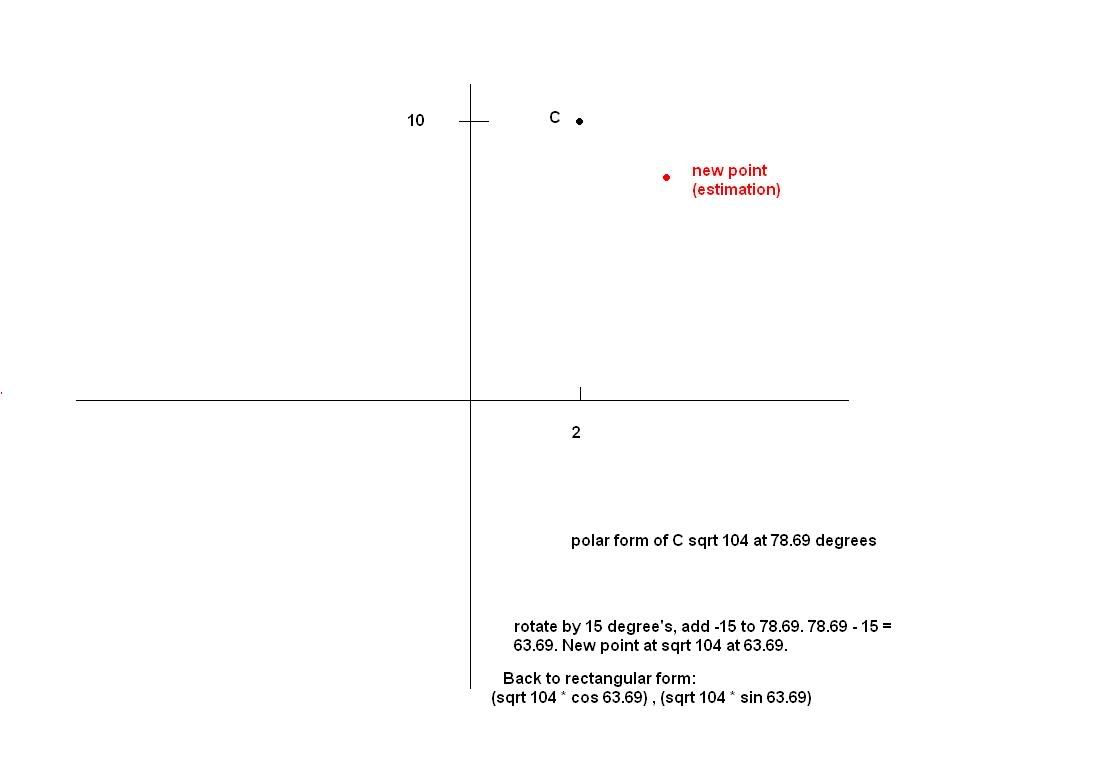
First the objects real world coordinates are taken and assigned to temporary variables, these new variables are used in 3d function so the real coordinates are not effected. First the angle to the given point from the viewers location is calculated. (remember my polarangle function? This is what I made it for!) then I use the distance formula ( sqrt (x1 - x2) + (y1 - y2) ) to find the direct distance from the viewer to the point. Now that I have the angle two the object and the distance to the object I know now its polar form. To rotate it, I simply add the negative of the desired roation, and then convert it back to rectangular form. So I remained paralell to the Z axis and rotated the points around me. The virtual points are then assigned the resultant values and the points are plotted. And the real coordinates of the object are completely unchanged.
Again this rotation is done first on the XZ axis (looking left to right) and on the ZY axis (looking up and down) I could also make an XY rotation to flip your view upside down. Easy to do but I don't really need it right now.
Scalling everything in relation to the z distance to the object and rotating the world around you seems pretty restricting and primitive but you can actually use the program without worring about it at all. You can change the viewers coordinates to move around, and rotate your view without a care in the world about how it works. Really the objects are just being translated to the z axis so the perpendicular distance can be easily found.
Heres a quick pic of how the rotation works. (this is down on the XZ axis and ZY axis and the projected)